

400-6262524
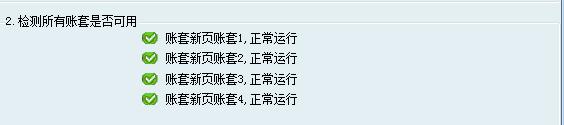
服務端—幫助—故障檢測
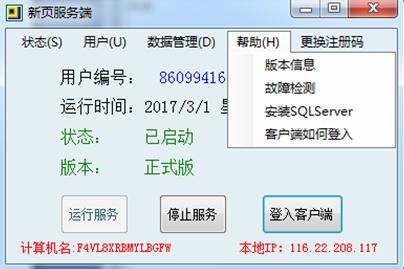
1.檢測數(shù)據(jù)庫是否安裝并且正常運行
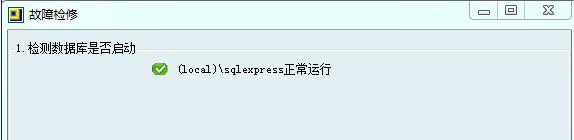
2.檢查賬套是否可用
一般重裝數(shù)據(jù)庫、數(shù)據(jù)庫丟失、數(shù)據(jù)庫版本不對都會造成賬套關聯(lián)失敗。需要安裝正確的數(shù)據(jù)庫版本,然后修復數(shù)據(jù),才能訪問。
3.修改數(shù)據(jù)庫密碼
當賬套需要由單機版轉(zhuǎn)為互聯(lián)網(wǎng)或局域網(wǎng)連接,測試連接數(shù)據(jù)庫提示連接失敗。數(shù)據(jù)庫密碼忘記的情況下,需重新修改數(shù)據(jù)庫訪問密碼。
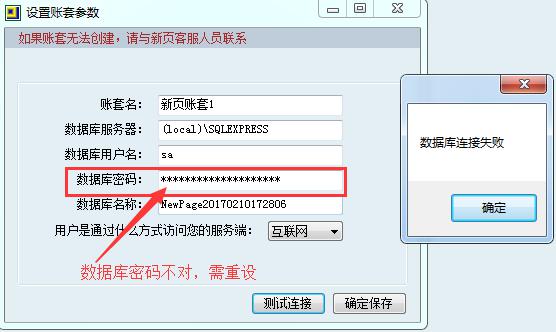

數(shù)據(jù)庫密碼設置不能過于簡單,須有數(shù)字、字母大小寫混合。設置完復制一份密碼以文檔形式保存好。再修改賬套的數(shù)據(jù)庫密碼,測試連接成功即可保存
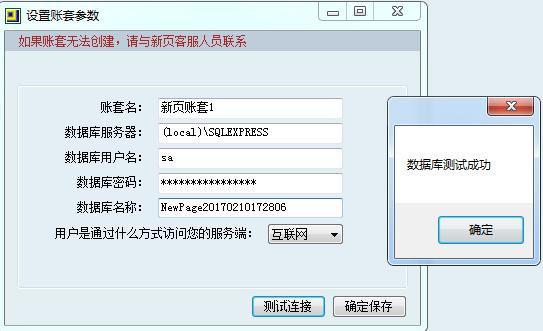
注意:電腦中還有其他管理系統(tǒng)如金蝶、管家婆,此時修改數(shù)據(jù)庫密碼可能會造成其他管理系統(tǒng)登錄失敗,請謹慎修改。
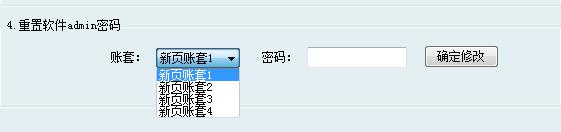
4.修改admin密碼
選中賬套,重置密碼。
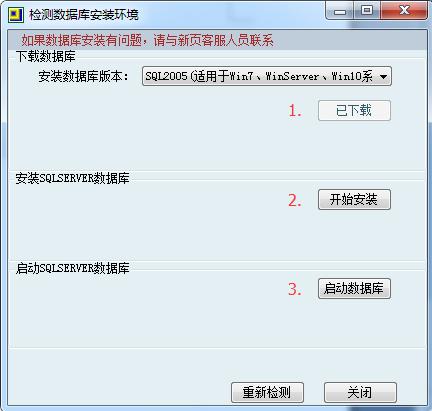
重裝系統(tǒng)、換主機、數(shù)據(jù)庫出錯等因素,造成賬套訪問失敗。需要安裝數(shù)據(jù)庫可在此處下載安裝,XP、Win7、Win8、Win10系統(tǒng)均可安裝SQL2005數(shù)據(jù)庫。
1.免費版和正式版的區(qū)別:http://www.homevv.com.cn/data-detail-203.html
2.免費版常見問題與解決辦法:http://www.homevv.com.cn/data-detail-204.html
3.如何安裝數(shù)據(jù)庫:http://www.homevv.com.cn/data-detail-257.html
4.新增賬套與套用其他賬套數(shù)據(jù):http://www.homevv.com.cn/data-detail-235.html
5.無法創(chuàng)建賬套:http://www.homevv.com.cn/data-detail-271.html
6.sql安裝失敗問題匯總:http://www.homevv.com.cn/data-detail-280.html
7.SQL數(shù)據(jù)庫安裝閃退提示:您的系統(tǒng)內(nèi)核語言不是簡體中文:http://www.homevv.com.cn/data-detail-295.html
8.檢測數(shù)據(jù)庫失敗、重裝數(shù)據(jù)庫方法:http://www.homevv.com.cn/data-detail-258.html
9.重裝系統(tǒng)后,恢復軟件及數(shù)據(jù):http://www.homevv.com.cn/data-detail-422.html
10.更換服務器主機方法:http://www.homevv.com.cn/data-detail-267.html
11.各版本教學下載:http://www.homevv.com.cn/data-detail-20.html
12.輸入的商品編號已存在的解決方法:http://www.homevv.com.cn/data-detail-216.html
13.輸入的客戶已存在的解決方法:http://www.homevv.com.cn/data-detail-215.html
14.修改入庫單提示庫存不足不能出庫:http://www.homevv.com.cn/data-detail-220.html
15.計量單位已經(jīng)被引用解決方法:http://www.homevv.com.cn/data-detail-217.html
16.出庫數(shù)量大于當前庫存數(shù)解決辦法:http://www.homevv.com.cn/data-detail-69.html






















 周一至周五8:45 — 17:45